Did you ever face a problem of losing your contacts from your Android phone? Ahh…it really gets me when I accidentally delete or lose phone number of my colleague or friends. I put all the blame on my phone for that even if it’s my fault and I guess most of you also do the same thing. That’s why I am writing this blog post on how you can recover deleted contacts from Android using a simple method.
Probably your contacts are not deleted
Before you start to panic realizing your contacts are gone, I will recommend you to first take a look at your Android device. It might be possible that your contacts are not deleted.
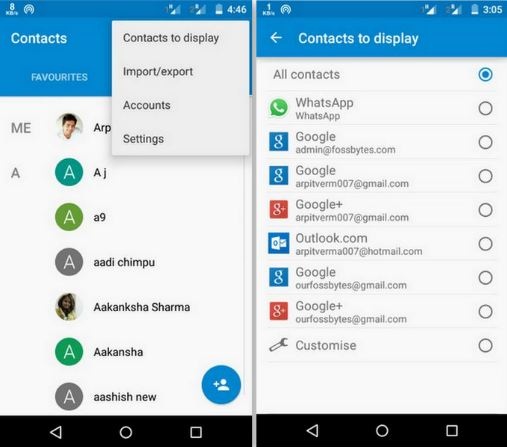
For that, first you need open theContacts, then click on thethree dothamburger symbol located at the top right corner. Now selectContacts to displayand make sure that you have selectedAll contacts. Now return and check whether you got your contacts back or not; if it’s back then it wasn’t deleted or lost, it was just hidden.
Recover deleted contacts with Gmail:
Recovering deleted contacts from an Android is very easy if your device is synced with Google account. you’re able to restore up-to 30 days old contacts deleted intentionally or unintentionally. The method to recover deleted contact with Gmail is as follow:
Sign in using the same Gmail-id that you have used to register your Android device.
Now click on Gmail drop-down menu located at left corner and select Contacts.
Now click onMoreand then selectRestore contacts. Here you can select time to restore the contacts or you can fill the time by selecting custom.
If you are still having any problem while restoring your lost contacts, let us know in comments.
Recommended:Google essential tips to make your android safe and sound


