The iPhone apps using your camera are a common thing. However, at times you need to keep an eye on what iPhone apps are accessing the camera just to verify there is nothing to worry about.
There could be an app on your iPhone that doesn’t have any camera-related features and yet has the camera permission.
How To Know About The iPhone Apps Using Your Camera?
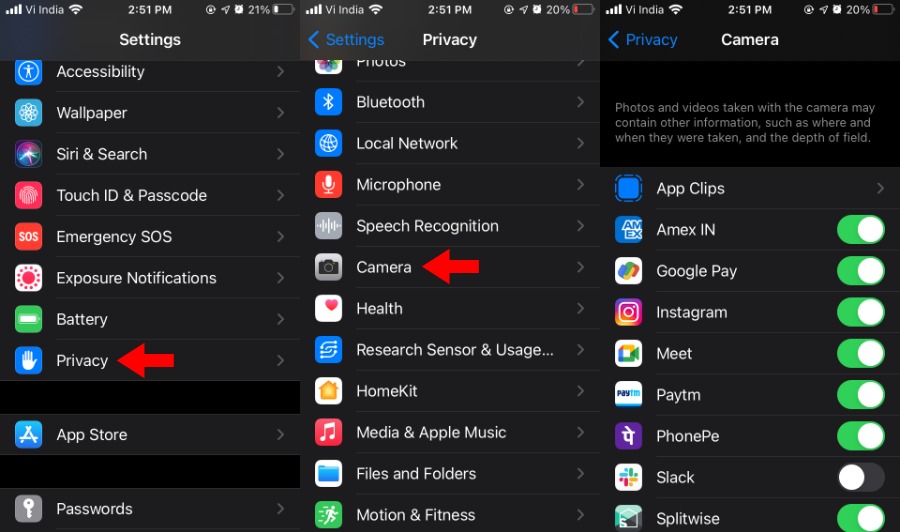
Getting a list of iOS apps with camera access enabled is an easy task. Just follow the steps mentioned below:
You can disable camera permission for an individual app by tapping the toggle button next to it. Note that you will have to disable camera access for each app individually; there is no single button that revokes the camera app permission from all apps simultaneously. Here, you can allow camera access for apps that haven’t been granted the same previously.
Also Read:How To Enable ‘Water Running’ Notification On iOS 14?
Track Real-Time Camera Usage On Your iPhone
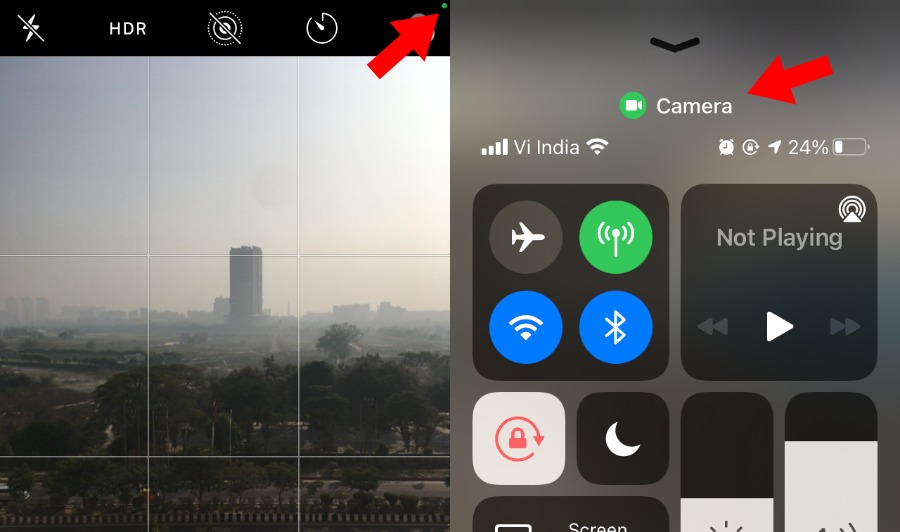
With the latestiOS 14 update, your iPhone will prompt when an app starts using the camera. Once you open the camera app, a green dot will appear in the top-right corner of the screen on the iPhone status bar.
Also, you’re able to pull down the Control Center to see whether the camera is being used or not.
Also Read:How To Set Dynamic Wallpaper In iOS 14.3?
Apps That Require iPhone Camera Permission
Here are some common apps and categories that require access to camera hardware on your device:
